Sunday, 3 June 2012

Week 8 -The last lecturer- internet ^^

Well, its a roller coaster ride for this semester and without i even noticing it, it's already the last lecturer for the telecommunication course. Mixed emotion arise in my mind when I enter the class; happy as we finally complete this course but feel pressurize as the final exam is just around the corner. Back to the main point though, today we learn about internet . For me, internet is a essential part of my life especially after i enter UTM   as it is my main medium of entertainment and relaxation. I always though internet as a mean of getting information and data globally. 


Internet is actually defined as  The Internet is a global system of interconnected computer networks that use the standard Internet protocol suite (often called TCP/IP, although not all applications use TCP) to serve billions of users worldwide.


The Internet protocol suite is the set of communications protocols used for the Internet and similar networks, and generally the most popularprotocol stack for wide area networks. It is commonly known as TCP/IP, because of its most important protocols: Transmission Control Protocol(TCP) and Internet Protocol (IP), which were the first networking protocols defined in this standard. It 
TCP/IP provides end-to-end connectivity specifying how data should be formatted, addressed, transmitted, routed and received at the destination. It has four abstraction layers, each with its own protocols. There is a arrangement/ hierarchy for the connection to internet; from single computer to LAN ( local area network) to ISP  to WWW ( world wide web )  We just need computerweb browser and internet access to connect ourselves to the internet.web browser is a software application for retrieving, presenting, and traversing information resources on the World Wide Web.

An Internet Protocol address (IP address) is a numerical label assigned to each device (e.g., computer, printer) participating in a computer network that uses the Internet Protocol for communication. The designers of the Internet Protocol defined an IP address as a 32-bit number. An IP address consists of two parts, one identifying the network and one identifying the node or host. The Class of the address determines which part belongs to the network address and which part belongs to the node address. All nodes on a given network share the same network prefix but must have a unique host number.

An Internet service provider (ISP) is an organization that provides access to the Internet.
Internet service providers can be either community-owned and non-profit, or privately owned and for-profit.
Access ISPs directly connect clients to the Internet using copper wires, wireless or fiber-optic connections. Hosting ISPs lease server space for smaller businesses and other people (colocation). Transit ISPs provide large amounts of bandwidth for connecting hosting ISPs to access ISPs.


The Hypertext Transfer Protocol (HTTP) is an application protocol for distributed, collaborative, hypermedia information systems. HTTP is the foundation of data communication for the World Wide Web.
Hypertext is a multi-linear set of objects, building a network by using logical links (the so called hyperlinks) between the nodes (e.g. text or words). HTTP is the protocol to exchange or transfer hypertext.


Ok, i thinks that's all from me. Hopefully you all enjoy reading my blog. Thanks for the support ya ^^.


Saturday, 12 May 2012

Week 7- continuation of Wireless Technology

Today, Dr Dayang continue her lecture on Wireless Technology- that is Bluetooth , Broadband and Infrared. Firstly, what is Bluetooth?  Of coarse it is not tooth of blue color ^^


Bluetooth is a wireless radio technology, based on an industry open standards set of specifications.The name Bluetooth is borrowed from Harald Bluetooth, a king in Denmark more than 1,000 years ago .The Bluetooth wireless protocol was designed to exchange data over short distances from fixed and mobile devices, to create personal area networks (PANs) – also called piconets. Up to seven Bluetooth devices can be used to create a piconet.


The key features of Bluetooth technology are robustness, low power, and low cost, and the fact that it has become a universal standard for exchanging data amongst a range of fixed and mobile devices. In addition, Bluetooth wireless technology has the ability to simultaneously handle both data and voice transmissionsThis means that users can use a variety of applications such as a hands-free headset for voice calls, printing and fax capabilities, and synchronizing PDAs, laptop, and mobile phone applications.
The future of Bluetooth looks strong, with initiatives underway for higher throughput, more ubiquitous usage and links with Wifi and Ultra Wideband (UWB) broadcast technology.Operating systems such as the Mac OS and Windows continue to have native support for Bluetooth.The Bluetooth SIG partners are working on enabling Bluetooth information points, to enable advertising models based around users pulling information from ‘information points’, rather than having to ‘push’ information out.Other emerging features include Bluetooth in cars; automatic configuration of piconets; and quality of service (QoS) improvements, for example enabling audio and video data to be transmitted at a higher quality.
 Next up is broadband. My definition to broadband is that it is an easy way to surf the internet as it is portable to any computer device such as notebooks and laptop as long as the device got a USB cable in it. In fact, I am one of the user of broadband ^^.
My beloved gadget - digi broadband ^^
The term broadband refers to a telecommunications signal or device of greater bandwidth, in some sense, than another standard or usual signal or device (and the broader the band, the greater the capacity for traffic).  Broadband refers to telecommunication that provides multiple channels of data over a single communications medium, typically using some form of frequency or wave division multiplexing. 
 Next, Dr Dayang also discuss with us about the infrared technology ^^


Infrared technology allows computing devices to communicate via short-range wireless signals. With infrared, computers can transfer files and other digital data bidirectionally. The infrared transmission technology used in computers is similar to that used in consumer product remote control units.
Computer infrared network adapters both transmit and receive data through ports on the rear or side of a device. Infrared adapters are installed in many laptops and handheld personal devices. In Microsoft Windows, infrared connections can be created through the same method as other local area network connections. Infrared networks were designed to suppport direct two-computer connections only, created temporarily as the need arises. However, extensions to infrared technology also support more than two computers and semi-permanent networks.


Infrared communications span very short distances. Place two infrared devices within a few feet (no more than 5 meters) of each other when networking them. Unlike Wi-Fi and Bluetooth technologies, infrared network signals cannot penetrate walls or other obstructions and work only in the direct "line of sight."


Ok, that's all from me this week. Until then, we will meet again ^^.

Saturday, 5 May 2012

Week 6- Unbounded media and wireless technology


Today, Dr. Dayang taught us about unbounded/unguided media and wireless technology.
Unbounded media

·                     No physical connection is required.
·                     Space or air is the transmission medium for electromagnetic waves.
·                     Source and destination can be static or mobile.
·                     Broad spectrum from low to high bandwidth is available.
·                     Can be quickly implemented.

After that , Dr. Dayang asked us to find the information about radio frequency (RF) and cellular phone.

radio frequency (RF)
Radio frequency is any frequency within the electromagnetic spectrum associated with radio wave propagation. When an RF current is supplied to an antenna, an electromagnetic field is created that then is able to propagate through space. Many wireless technologies are based on RF field propagation.

cellular phone
A mobile phone (also known as a cellular phone, cell phone and a hand phone) is a device that can make and receive telephone calls over a radio link whilst moving around a wide geographic area. It does so by connecting to a cellular network provided by a mobile phone operator, allowing access to the public telephone network.


Wireless technology
Next,we learn about wireless technologyWireless telecommunications is the transfer of information between two or more points that are not physically connected. Distances can be short, such as a few metres for television remote control, or as far as thousands or even millions of kilometres for deep-space radio communications.It is a term used for mobile IT equipment. It is encompasses cellular phones, personal digital assistants (PDA’s) and wireless wiring. Other examples of wireless technology include GPA units, garage door openers and or garage door, wireless computer mice and keyboards, satellite television and cordless telephones.  


Here is a table to compare and contrast between 3G and 4G wireless technology.
3G
4G
Technology Used
WDM.A
EVDO
HSP
LTF
Wi Max
Speed
600 KB per sec
1.4 MB per sec (downlink)
5.8 MB per sec (uplink)
10 times faster than 3G
3.6 MB per sec (downlink)
Switching Type
Circuit switching
Packet switching


As always, here is a video for all of you to enjoy. Thanks for reading the post ^^.


Thursday, 26 April 2012

WEEK 5- Cabling


Cable is the medium through which information usually moves
from one network device to another. Several types of cable are
commonly used with LANs.In some cases,a network will utilize only one type of cable, other networks will use a variety of cable types.There are four types of cables namely :

  1.      Unshielded Twiested Pair (UTP) 
  2.      Shielded Twisted Pair (STP) 
  3.      Coaxial Cable
  4.      Fiber Optic Cable
  5.      Wireless LANs

      Unshielded Twiested Pair  (UTP)


  •   four pairs of wires inside the jacket
  •    each pair is twisted with different twist per   inch to help eliminate  interference from adjacent pairs and other electrical devices.


 Shielded Twisted Pair (STP) 


  •  consists of two individual wires wrapped in a foil shielding to help provide a more reliable data communication. 
  • suitable for environments with electrical interference but the extra shielding can make the cables quite bulky. 
  • often used on networks using Token Ring topology.
Coaxial Cable


  • Coaxial cabling has a single copper conductor at its center. 
  • A plastic layer provides insulation between the center conductor and a braided metal shield. 
  • The metal shield helps to block any outside interference from fluorescent lights, motors, and    other computers.
  • The most common type of connector   used with coaxial cables is the Bayone-Neill-Concelman (BNC) connector. 


  • Fiber Optic Cable  consists of a center glass core surrounded by several layers of protective materials and transmits light rather than electronic signals eliminating the problem of electrical interference. 
  • Fiber Optic Cable is ideal for certain environments that contain a large amount of electrical interference. 
  • It is able to transmit signals over much longer distances than coaxial and twisted pair.


Summary of Ethernet cabling 

10BaseT : Unshielded Twisted Pair : 100 meters
10Base2 : Thin Coaxial : 185 meters
10Base5 : Thick Coaxial : 500 meters

10BaseF : Fiber Optic : 2000 meters'


Cable and typology 


   Linear Bus : Coax, twisted pair, Fiber : Ethernet, Local talk
   Star : Twisted pair, fiber : Ethernet, Local talk
   Star-wired Ring : Twisted pair : Token ring
   Tree : Coax, twisted pair, fiber ; Ethernet


Ok, that's all from me today, thanks for visiting ^^


Saturday, 7 April 2012

Week 4- Typology, Protocol and Architecture

Today, we learn about typology, protocol and architecture. Typology can be classified into two; 
Physical and Logical typology.


Physical Typology- mapping of links and notes into a geometrical     shape.


Logical Typology- mapping of the flow of data.


Physical typology can be classified into five types


  • linear bus
  • ring
  • star
  • star -wired ring 
  • tree
Linear bus typology consist of a main cable and terminator at both end. All notes is connected to the main cable. Linear bus typology is easy to be connected and need less wire but may the whole system may malfunction if the main cable is broken. Ethernet and local talk uses linear bus typology.

Ring typology is similar to linear bus in many aspects. The only difference is that bus typology do not have terminator as all notes is interconnected with each other. 


Star typology is designed so that each nodes is connected to a hub/concentraterEthernet and local talk uses linear bus typology . Star typology is easy to add new nodes and will not malfunction if one of the nodes breaks down. However, it need more cable length and cost more compare to linear bus. 


Star-wired is externally same as star typology. Internally, the MAU (multiststion access unit) allows the information to pass from a device to a ring or circle. The Token Ring uses star- wired typology.


A tree topology combines characteristics of linear bus and star topologies. It consists of groups of star-configured workstations connected to a linear bus backbone cable. Tree typology allows point to point wiring for each nodes but  the overall length of each segment is limited by the types of cable used. 


In this lesson, we also learn about protocols. Protocols is a set of rules that governs the communication the computers in a network. It can be divided into
  1. Ethernet
  2.  Localtalk
  3. Token Ring
  4.  Fiber Distributed Data Interface (FDDI )

We also learn about the types of architecture:
  • Peer to peer 
  • client/server

In peer to peer, all computers are considered equal and have the same tendency to share information . Peer to peer network lacks security as there is no central computer to control the network.


In client/ server network, there are a central network that governs the transfer of data between the computers. The server is the heart of the system , providing security and access to information.  


Lastly, our homework of the day is to find out the definition of Asynchronous Transfer Mode (ATM)  . It encodes data into small, fixed-sized cells. This differs from approaches such as the Internet Protocol or Ethernet that use variable sized packets or frames.  


That's all from me this lesson. Thanks 4 spending time to read it ^^


Thursday, 22 March 2012

Week three- Networking

 Today is week 3 of the class and today we learn about networking. ^^


Computer network is:
- A collection of computers and other hardware devices that are   connected together to share hardware, software, and data as well as to communicate with one another.


A basic network connects 2 computer together by a cable to exchange data and information  while a LAN, allows the sharing of data and devices such as modems and printer.

–Types of LAN based on geographic coverage.
LAN – Local Area Network
WAN - Wide Area Network
MAN - Metropolitan Area Network


computer network can be categorized according to three properties:
  1. typology
  2. protocol
  3. architecture  

Network topology is the layout pattern of interconnections of the various elements (links, notes) of a computer network. It is the geometrical arrangement of the network. The picture below show the different arrangement of the network.


 network protocol defines rules and conventions for communication between network devices. 

The most common network protocols are:
  1. Ethernet
  2. Local Talk
  3. Token Ring
  4. FDDI
  5. ATM
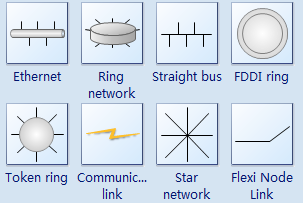
The follow is some common-used network symbols to draw different kinds of network protocols.


Types of Network Protocols


A network architecture is the specification of design principles (including data formats and procedures) for creating a network configuration of data processors. Two most common network are peer- to- peer and server/client network 

server/client 


There are two types of transmission media; bounded and unbounded. 

     • Bounded Media         • Unbounded Media (air or a vacuum)
- Twisted pair wire        - AM and FM radio
- Co-axial cable             - TV broadcasting
- Fiber optic cables        - Satellite communication
- Microwave radio
- Infrared signals 

- Below are some examples of network electronic device and
their properties:

  • A network bridge connects multiple network segments.A bridge uses a forwarding database to send frames across network segments.


  •  hub is a device for connecting multiple Ethernet devices together and making them act as a single network segment.

  • gateway is used to interfaced with other network.A gateway is a network point that acts as an entrance to another network.

As usual, please enjoy the video regarding computer networking: